![Dye & Durham Logo.png]](https://solutions.dyedurham.ca/hs-fs/hubfs/DD%20Direct%20V2/Dye%20%26%20Durham%20Logo.png?height=40&name=Dye%20%26%20Durham%20Logo.png)
This article covers how to enter/process a Journal Entry affecting the General Ledger accounts. A Journal Entry is the offsetting entry with debit and credit to different General Ledger accounts and does not affect Clients/Matters or Vendors.
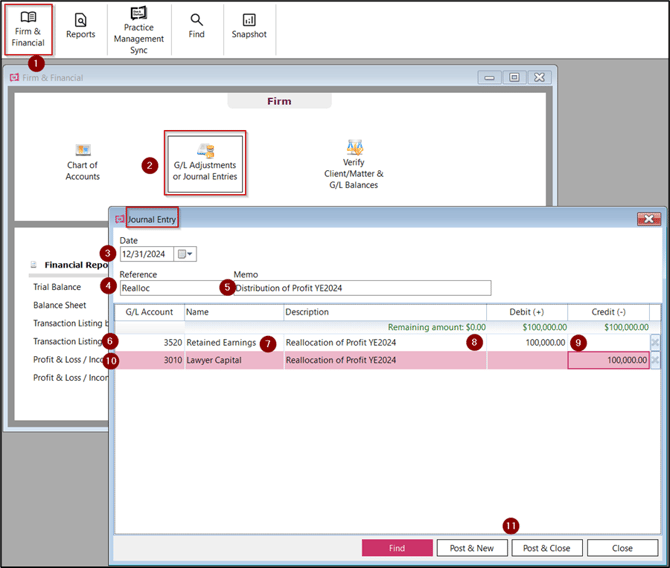
To enter General Ledger or Journal Entry:
- Click on Firm and Financial
- Select G/L Adjustments or Journal Entries
- Date - Select or Enter the transaction date
- Reference - Enter the reference (8 characters only)
- Memo - Enter a description/reason to support the journal entry (35 characters only)
- G/L Account - Select or Enter the General Ledger account to be debited, and Tab/Enter to move to the next field
- Name - The name/description of the General Ledger account will reflect automatically.
- Description - Enter the description of the journal entry
Note:
- Instead of retyping the description in the Memo field, highlight the Memo field, right click Copy, click back in the Description field and CTRL V to paste.
9. Debit - Enter the amount, Tab to move to the next line
10. G/L Account - Select or Enter the General Ledger account to be credited, and Tab/Enter to move to the next field
Note:
- If applicable, multiple journal entries can be added on the condition that date range is in the same calendar month.
11. Click on Post and Close to process the journal entry and close the screen, or Post & New to post the journal entry and open a new “Journal Entry” window, or Close to not post the journal entry and loose the changes.
Note:
- Find clicking here will open the Find feature to validate processed journal entries before proceeding to process the entry.
- Journal entries will negatively affect the balance between the G/L accounts and the Client/Matters if posted to
- Unbilled Fees
- Unbilled Disbursements
- Accounts Receivable Fees
- Accounts Receivable Disbursements
- Client Funds in Trust
- All trust accounts
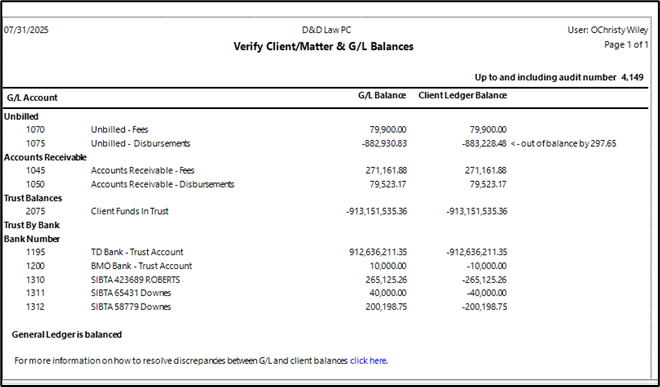
For assistance if the report displays as Out of Balance contact the Customer Support Team.
Journal entries will also result in the Accounts Receivable Aging and Accounts Payable Aging reports to be inaccurate when compared to the Trial Balance and are not advised.
Journal entries can be reversed using the Find Feature.