![Dye & Durham Logo.png]](https://solutions.dyedurham.ca/hs-fs/hubfs/DD%20Direct%20V2/Dye%20%26%20Durham%20Logo.png?height=40&name=Dye%20%26%20Durham%20Logo.png)
To create a new vendor:
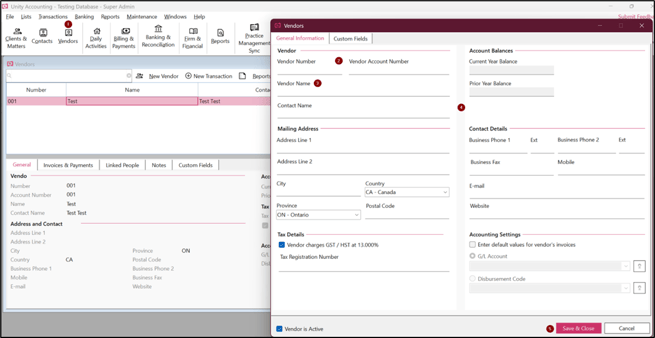
- Click on Vendors > New Vendor.
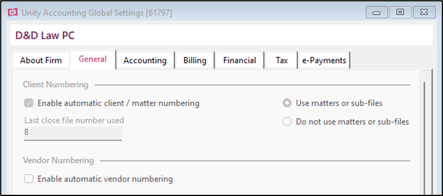
- Enter a vendor number, vendor account number, (if not automated) and vendor name. To automate the vendor number, go to Maintenance > Global Settings > General and select Enable automatic vendor numbering.
- Fill the Vendor form with relevant details.
- Click on Save and Close.
Tips:
- In case the Tax Details box is checked, Tax Registration number is mandatory.
- Enter the default values like G/L Account or disbursement codes by checking Enter default values for vendor invoices.
- Remember to select Vendor is Active.