![Dye & Durham Logo.png]](https://solutions.dyedurham.ca/hs-fs/hubfs/DD%20Direct%20V2/Dye%20%26%20Durham%20Logo.png?height=40&name=Dye%20%26%20Durham%20Logo.png)
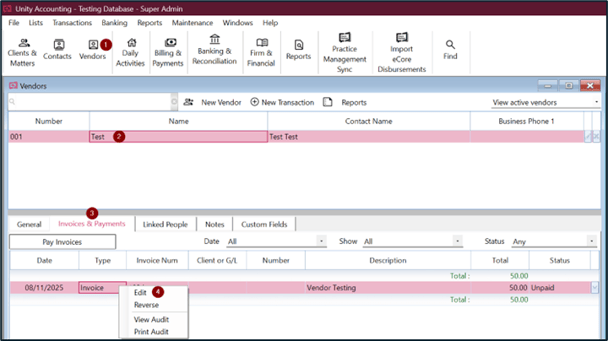
To edit a vendor invoice:
- Click on Vendors.
- Select the vendor where the invoice is posted.
- In Invoices & Payments tab, select the vendor invoice which needs to be edited.
- Right click > Edit > Yes or click on the dropdown and select Edit.
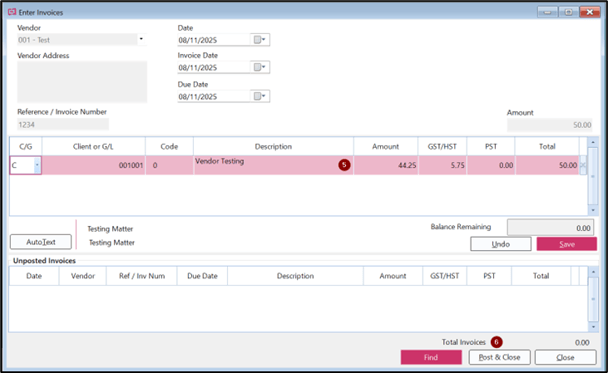
- Make necessary changes, however changes cannot be made to the vendor, invoice number or amount of the invoice.
- Click on Post and Close.
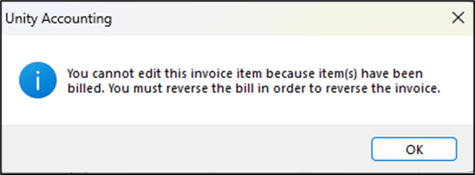
If a vendor invoice has been billed as a client disbursement, and the user attempts to edit the invoice an error message will appear. To edit the invoice the user must first reverse the client's bill.
Tips:
- Ensure the status of an invoice is unpaid.