![Dye & Durham Logo.png]](https://solutions.dyedurham.ca/hs-fs/hubfs/DD%20Direct%20V2/Dye%20%26%20Durham%20Logo.png?height=40&name=Dye%20%26%20Durham%20Logo.png)
The Ontario Levy applies only to firms operating in Ontario, Canada. It is a surcharge that is charged by the Upper Canada Law Society. The levy applies to files that are real estate and civil litigation matters. The $65.00 value for real estate and the $100.00 value for civil litigation, includes the PST.
To use the Ontario Levy report, create a disbursement code for the levy in the Disbursement Codes screen. The correct settings for the disbursement code are GST/HST = Y and Tax on Billing selected. The Ontario Levy report produces a list of all client files for which disbursements were entered using one of these two disbursement codes.
Unity® Accounting includes the two default disbursement codes: OLL – Transaction Levy – Litigation, as a fixed rate of $57.52 and OLR – Transaction Levy – Real Estate, as a fixes rate of $48.67. These codes can be modified accordingly. 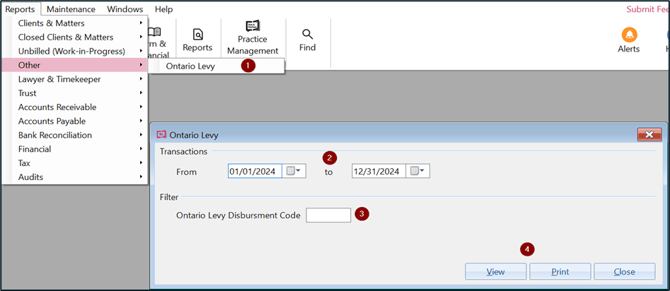
To print an Ontario Levey Report:
- Click Reports > Other > Ontario Levy.
- In the Transactions From and To fields, enter the date range for transactions to include in the report. Normally would be for the remitting quarter.
- Enter the Disbursement code used for the Ontario Special Levy. Enter OLL or OLR.
- Select View to display the report on screen or select Print to send it to printer.
Tip:
- The report results will match the Trial Balance General Ledger Account assigned to the Ontario Transaction Levy Payable.