![Dye & Durham Logo.png]](https://solutions.dyedurham.ca/hs-fs/hubfs/DD%20Direct%20V2/Dye%20%26%20Durham%20Logo.png?height=40&name=Dye%20%26%20Durham%20Logo.png)
Cheque printing can be done either:
- Whilst posting the cheque, or refer to article “How to Write a Trust Cheque” or “How to Write a General Cheque”
- From “File>Print” option
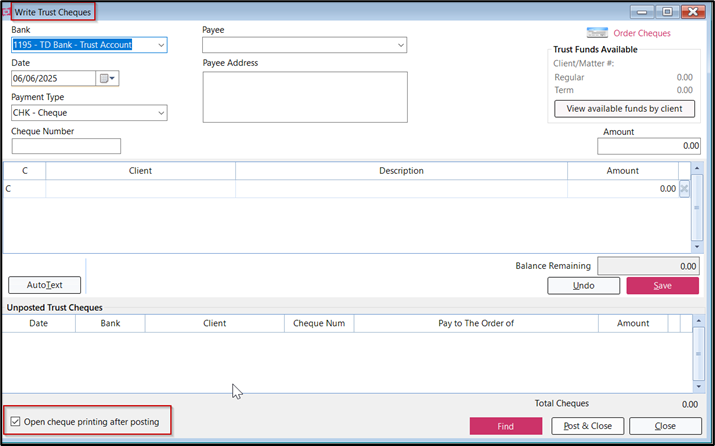
File > Print:
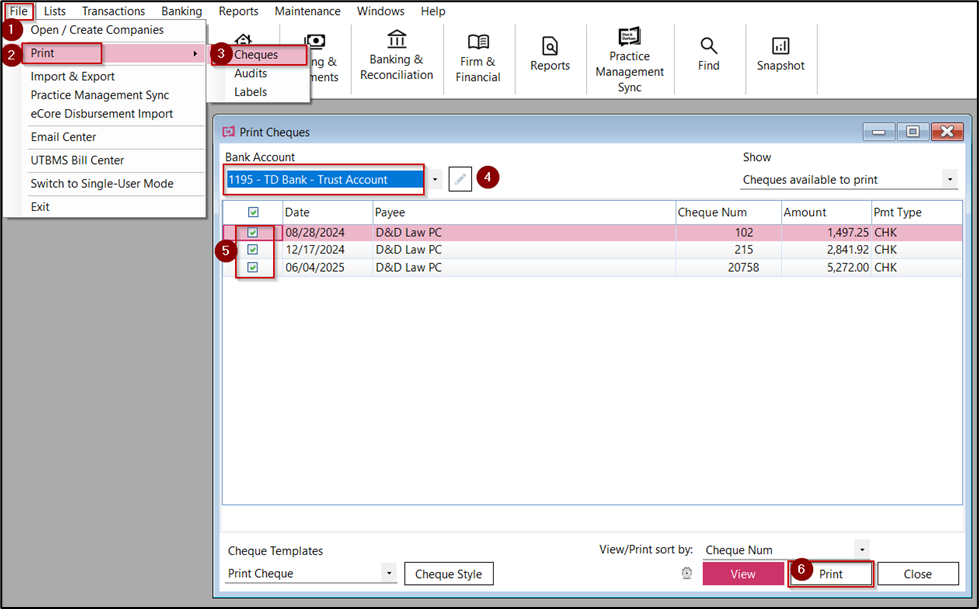
In the event that the cheque/s were not printed during the above process you may print cheques manually by using the following steps below:
To print cheque:
- Click on File
- Select Print > Cheques.
- Select the bank from the drop-down menu of the bank account.
- Select the cheque you want to print.
- Click on Print.
- Select all the cheques you want to print at one time.
- If the cheques are printed but you still want to print a cheque again, click on the drop down under show and select Cheques available to reprint.
Tips:
- You can change the style of the cheque by clicking on cheque style and modify the same as per your requirement.
- Multiple cheque templates may be created and selected in this window if required.