![Dye & Durham Logo.png]](https://solutions.dyedurham.ca/hs-fs/hubfs/DD%20Direct%20V2/Dye%20%26%20Durham%20Logo.png?height=40&name=Dye%20%26%20Durham%20Logo.png)
To write off a bill:
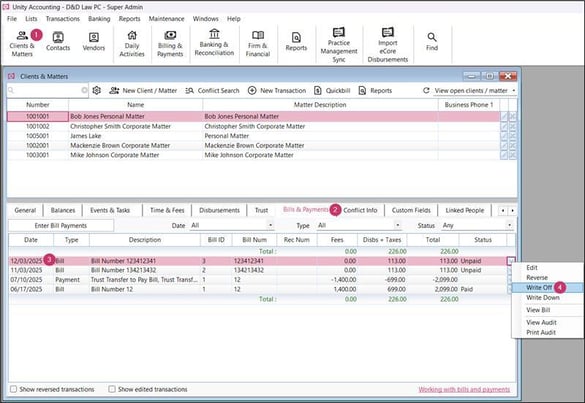
- Click on Clients & Matters and select the client.
- Click on Bills & Payments tab.
- Select a bill to be written off.
- Right click on a bill > Write Off.
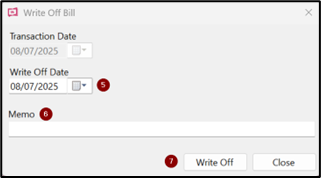
- Select an appropriate date on which bill is to be written off.
- Enter the reason of write off in the memo field.
- Click on Write Off.
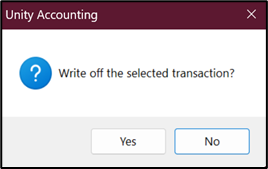
- Confirmation of the Write off will display.

Note:
- Only partially paid or unpaid bills can be written off.
Tips:
- To understand the allocation of a bill that has been written off review the audit of the write off.
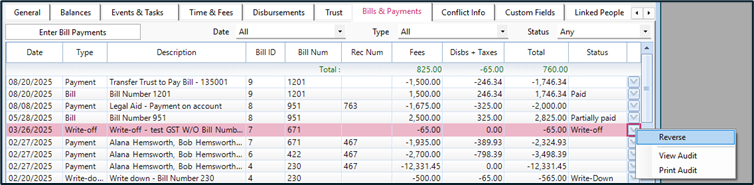
- The status of the bill will display as Written off. The Write off of the bill will display as a transaction in the Bills & Payments.
- The Write off can be reversed at any time. Simply right click the transaction and select Reverse.