![Dye & Durham Logo.png]](https://solutions.dyedurham.ca/hs-fs/hubfs/DD%20Direct%20V2/Dye%20%26%20Durham%20Logo.png?height=40&name=Dye%20%26%20Durham%20Logo.png)
This list is used to identify the type of law that applies to each individual client/matter.
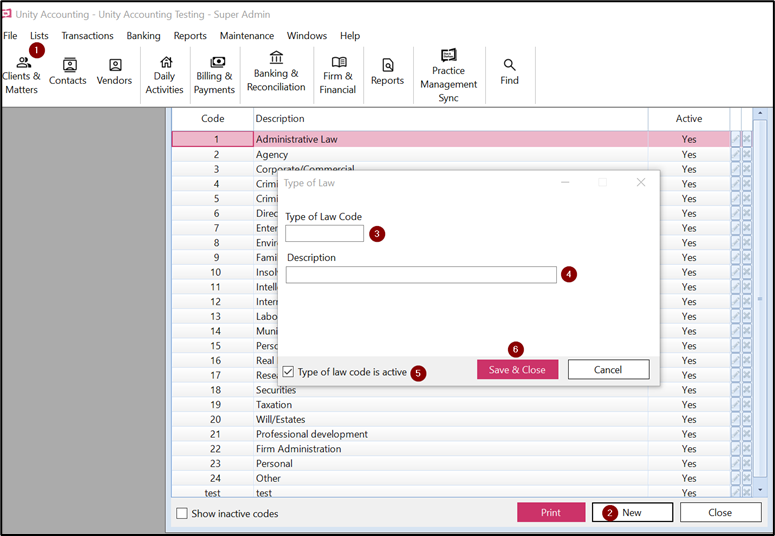
To create a new type of law code:
- Click on Lists > Type of Law Codes.
- Click on New.
- Enter the next number which must be unique and numeric, alphabetic or alphanumeric.
- Enter the description.
- By default the box which says Type of Law Code is active is checked.
- Click on Save and Close.
- To edit a type of law code, select the code.
Note:
- Default codes are provided when starting with Unity Accounting. These default codes can be deleted/edited or made inactive as required by each individual firm.
Tips:
- Do not edit existing codes if they are assigned to other clients or it will impact the type of law for all assigned clients.
- To modify existing codes, select that code and click on the Pencil on the right side of the screen.
- A law code in use cannot be deleted.
- To make the law code inactive, uncheck the box Type of Law Code is active on the left side bottom of the screen.