![Dye & Durham Logo.png]](https://solutions.dyedurham.ca/hs-fs/hubfs/DD%20Direct%20V2/Dye%20%26%20Durham%20Logo.png?height=40&name=Dye%20%26%20Durham%20Logo.png)
This article covers how to find a list of Bank Balances per Bank for both Trust and General.
The View Bank Balances feature provides a quick way to check the current Bank General Ledger balances.
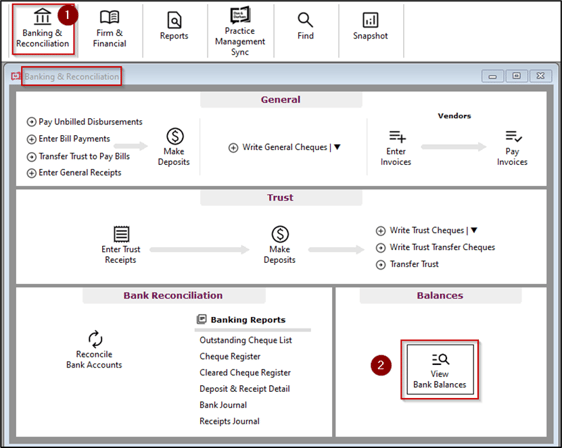
To view a bank balance:
- Click on Banking & Reconciliation
- Click on View Bank Balances
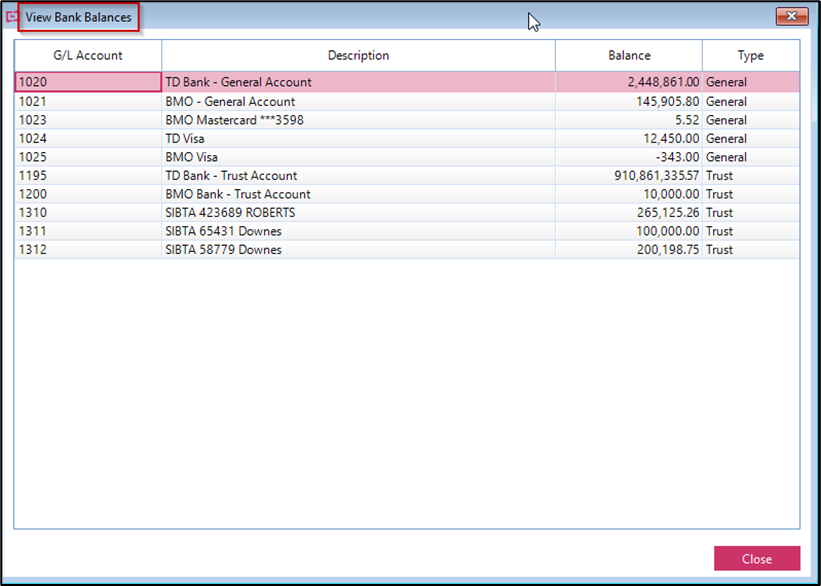
Tips:
- Bank accounts that have been set to “Inactive” will not display on the Bank Balances window
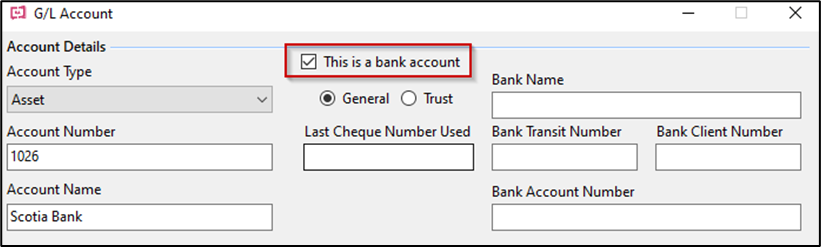
- If a bank account is not displayed on the Bank Balances window, it is usually because the account is defined incorrectly. Open the Chart of Accounts in Firm & Financial menu, and search for the bank account. Right click to edit and ensure that the account is setup as a bank account.
- The Bank Balances window displays General Ledger Account totals regardless of transaction date, including any transactions entered using a future date.
Therefore, when comparing a bank balance on the View Bank Balances may differ compared to the “G/L Closing Balance”, and other reports where a date range has been selected.